Sample deliverables
Every completed LabDataReview job returns three files: a print-first review workpaper (PDF), a 5-tab qualification workbook (Excel), and structured findings (JSON). Below is how each file keeps source evidence, criteria, calculations, and validator decisions separate.
Open 4-page PDF sample Upload a package
1. Open items first, then selected checks
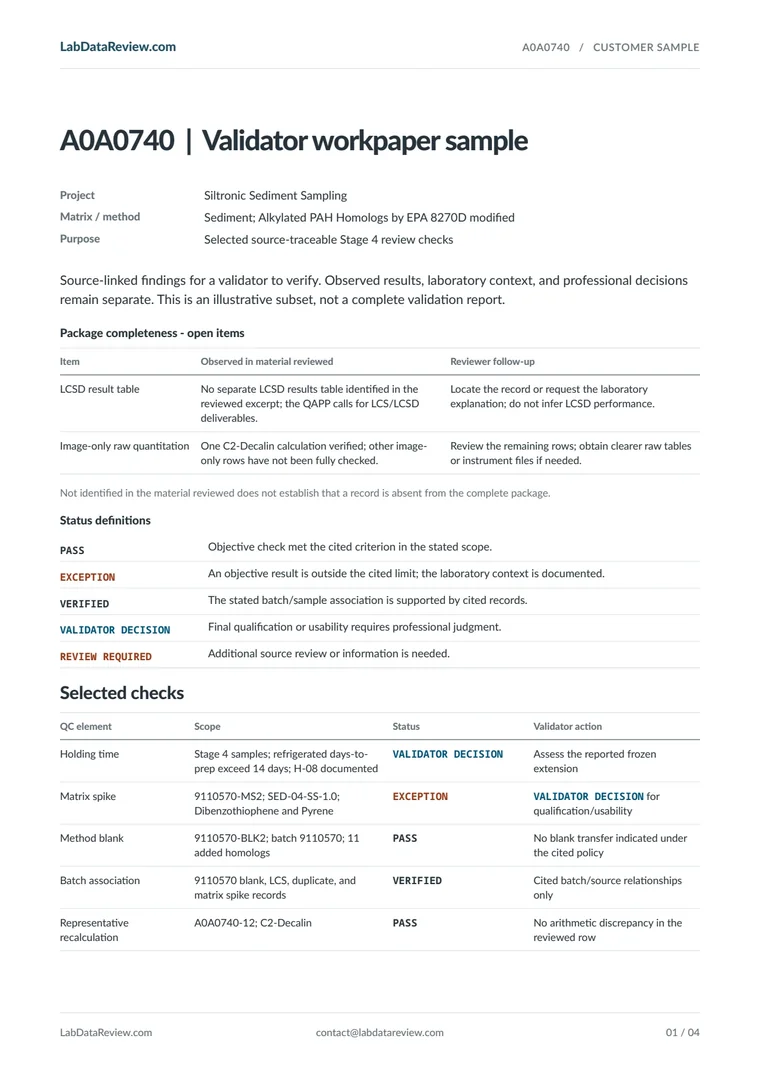
Page 1 of the workpaper surfaces open completeness and source-review items ahead of checked findings, followed by explicit status definitions.
Checks against laboratory limits stay labeled VERIFIED or EXCEPTION unless a project QAPP is supplied. Nothing is silently promoted to project PASS, and missing records are disclosed rather than guessed.
2. Holding times, QC exceptions, and source trails
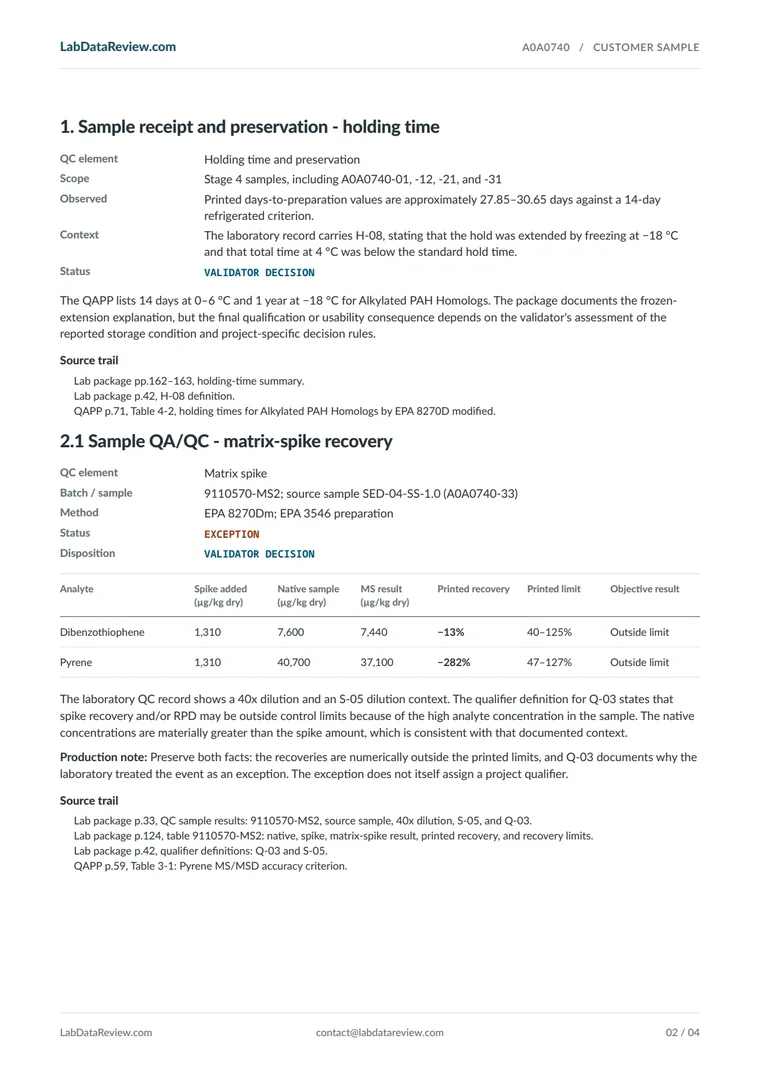
Sections follow chemist workflow order: receipt and holding times, sample QA/QC, instrument checks, recalculations, and reporting.
For matrix spikes, recoveries of -13% and -282% remain outside printed limits alongside the laboratory's 40x dilution and Q-03 high-native-concentration context, with exact page citations below the table.
3. Worked recalculations and validator action index
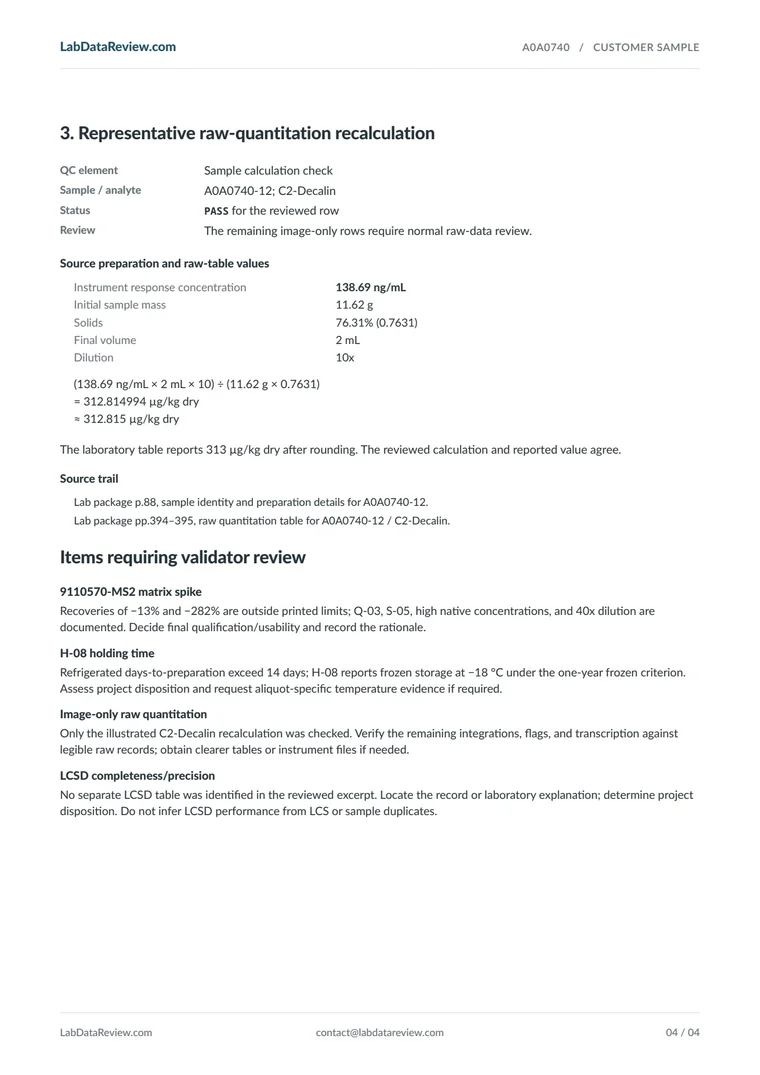
Raw-quantitation and %REC/%RPD recalculations show the printed operands, formula, computed result, and rounding comparison.
The closing section indexes only the items that require validator judgment or follow-up, keeping final qualification flags and usability calls with your chemist.
4. Five-tab Excel qualification workbook
When an Excel or CSV EDD is included, Results_Qualification preserves every original column and literal value verbatim (including ND, <RL, leading zeros, and scientific notation).
Reconciled PDF findings, QC alerts, and source pages sit beside four intentionally blank blue-header chemist columns (Validator_Qualifier, Reason_Code, Bias_Direction, Validator_Notes) with Excel dropdown validation.
| SampID | Analyte | R_Rslt | R_PQL | R_Units | LDR_ |
LDR_ |
Validator_ |
Reason_ |
Bias_ |
|---|---|---|---|---|---|---|---|---|---|
| 2310267-001B | Cyanide | 2.91 | 5.00 | ug/L | VALIDATOR DECISION: Holding time 593,096 s | S1 p.3 | blank | blank | blank |
| 2310267-004A | Copper | 41.4 | 0.500 | ug/L | EXCEPTION: Method blank >= RL | S1 p.6 | blank | blank | blank |
| 2310267-004A | Zinc | 118 | 2.00 | ug/L | EDD '118' vs PDF '1 18'; MB < RL | S1 p.6 | blank | blank | blank |
5. Structured findings (JSON)
Every job also includes machine-readable JSON findings containing the full structured check accounting, performed and unperformed stage coverage, EDD reconciliation records, and source coordinates for automated LIMS or internal QA tooling.
What stays with the chemist: final qualification flags, data usability calls, and visual inspection of raw chromatographic peaks or mass spectra when flagged by Stage 4 checks.
Illustrative subset from a public laboratory package alongside representative workbook rows. Actual output length and sections vary with the submitted package, EDD, and project QAPP.